



07 Oct Video templates for sales teams: Build a scalable library without losing the human touch
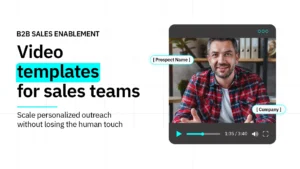 When personalized video outreach works, it works exceptionally well. A rep records a quick note, speaks directly to a prospect’s situation, and transforms a cold email thread into an active conversation.
The reason most sales and revenue teams do not use video consistently is not a lack of motivation. It is friction.
Asking a Sales Development Representative (SDR) or Account Executive (AE) to script, record, and edit a brand-new video for every cold prospect, post-demo follow-up, and stalled deal consumes time reps simply do not have. So video remains an occasional tactic used by a few highly motivated reps, rather than becoming the standard team-wide workflow it could be.
Dynamic video templates solve this friction problem. By building a structured template library, your revenue team can record core videos once, then personalize and deploy them across hundreds of touchpoints.
However, scaling video outreach carries a distinct operational risk. Poorly executed templates produce a library everyone ignores because the videos sound scripted, feel generic, and destroy the exact human signal video is meant to create.
Here is how to build a dynamic video template library that scales across your pipeline while keeping your team’s authentic human signal intact.
What dynamic video templates actually are
A dynamic video template is a reusable recorded message designed to support personalized video outreach across multiple prospects, accounts, or stages of the sales process.
At its simplest, a rep records a short introduction once and uses it across multiple emails, tweaking only the subject line or thumbnail wrapper. The core video stays the same, while the surrounding email wrapper reflects the recipient.
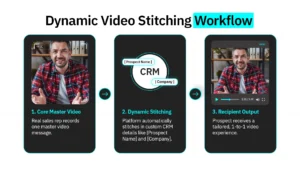
To scale without losing the human touch, advanced dynamic video platforms like Spokenote take personalization much further. Spokenote uses dynamic video stitching to combine segments of real video into a personalized experience, allowing teams to tailor outreach while keeping the human recording at the center.
This allows revenue teams to achieve meaningful personalization down to the individual or cohort level. Depending on your campaign, dynamic personalization can include:
- The viewer’s specific name and company seamlessly stitched into the video flow.
- References to specific industry pain points or recent company initiatives.
- Tailored context within the delivery page and surrounding email wrapper.
- High-impact messaging tailored to prospect tier or pipeline status.
This approach keeps the person delivering the message at the center of the experience. The technology handles the repetitive personalization work while the message itself still feels direct, relevant, and human.
5 core video template types to build around
You do not need an enormous library to get started. For most B2B sales teams, it makes sense to begin with the recurring moments that create the most outreach friction. These five template types provide a practical foundation, with room to build additional variations as your library grows.
| Template Name | Primary Owner | Core Strategic Goal | Target Length |
|---|---|---|---|
| Cold Outbound Prospecting | SDRs & BDRs | Break through inbox noise and lift reply rates | 60–75 seconds |
| Post-Event / Webinar Follow-Up | Sales & Marketing | Capitalize on shared event context within 24 hours | 60–90 seconds |
| Post-Demo Follow-Up | Account Executives | Summarize value, address friction, and build committee consensus | 2–3 minutes |
| Stalled Deal Rescue | Account Executives | Re-engage quiet pipeline without sounding passive-aggressive | 45–60 seconds |
| Renewal & Retention Check-In | Customer Success | Highlight product usage milestones and expansion opportunities | 60–90 seconds |
1. The cold outbound prospecting video
Cold outreach gives you very little time to establish relevance, so keep this direct. A glossy corporate pitch will not cut it. Record a core video identifying a specific problem relevant to their role, and let Spokenote physically stitch in personalized segments mentioning their specific name or company. Keep it between 60 and 75 seconds. It is sharp, memorable, and proves they are not just another row on a spreadsheet.
2. The post-event or webinar follow-up
Events provide something invaluable in outreach: shared context. When a prospect attends your virtual webinar or trade show booth, avoid sending a sterile automated email blast. Instead, use a template where your rep personally references the exact session topic discussed. Deploying this follow-up within 24 hours keeps the conversation connected to something top-of-mind for the recipient.
3. The post-demo personal follow-up
Buying committees rarely attend every discovery call or product demo. A demo follow-up needs specific structural detail because the strongest message reflects what actually happened on the call.
- A quick recap of the main operational challenge discussed.
- A stitched-in video segment highlighting the specific part of your platform most relevant to their team.
- One clear, low-friction next step to keep momentum moving forward.
4. The stalled deal rescue mission
Every sales pipeline has opportunities that quietly go dark. A short, empathetic video can reopen the conversation without delivering a guilt trip. Briefly remind them of the value analyzed on your previous call, stitch in a reference to their specific business case, and offer an easy way back into dialogue. Acknowledge that priorities shift and give them a friction-free option to reconnect.
5. The renewal and retention check-in
Personalized video should support the customer relationship long after the initial deal closes. Customer Success Managers (CSMs) can build templates around key account milestones, such as 90-day check-ins or upcoming contract renewals. Tailor the experience using account usage data so every client receives a message reflecting their specific product adoption.
A video script framework that sounds like a human

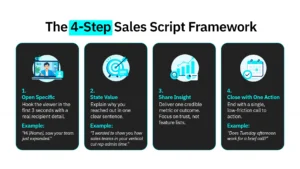
The script can make or break a template. By the time a sales script goes through multiple rounds of internal review, it can start sounding more like a corporate press release than a natural conversation. Give your reps a structural path through the video without scripting every pause:
- Open with the specific (First 3 seconds): Specific details create instant context. “Hi [Name], I saw your team just expanded your SDR org this quarter.”
- State the value in one sentence: Tell the viewer exactly why you reached out within the first fifteen seconds. “I wanted to show you how sales teams in [Industry] are making personalized video outreach easier to scale.”
- Deliver one specific insight: Give them one clear, credible idea that relates to their role. Do not list features. Focus on building trust.
- Close with one action: Keep the ask simple and binary. “Does Tuesday afternoon work for a brief 15-minute call?”
How to build a scalable video template library
Creating a video template library requires an initial effort, but once the core assets are in place, they compound in value over time.
- Start with real conversations: Listen to how your top performers naturally speak on calls. Real interactions provide a far stronger foundation than polished marketing copy. Have your best reps write the initial frameworks and record the first takes.
- Keep production setup simple: You do not need a Hollywood camera crew. A standard laptop webcam, natural light, a quiet room, and clear audio can be enough to create professional, natural-looking video.
- Standardize naming conventions: Build a clear naming hierarchy before recording (for example: Outbound-SaaS-VP-Sales-v1). Disorganized libraries lead to abandoned tools.
- Review templates quarterly: Messaging and positioning evolve over time. Look at which videos are holding attention, generating replies, and moving conversations forward. If viewers consistently drop off early, revisit the opening hook, message length, and relevance of the first few seconds.
Keeping the human signal intact at scale
The primary risk with video templates is that efficiency gains come at the expense of the authentic connection that makes video work. If templates are too polished or uniform, the prospect’s commercial content filter kicks in and reply rates drop back toward standard text emails.
- Keep delivery genuine: The first or second take is often the best take. Reps who over-rehearse lose the spontaneous quality that makes video feel personal. Record the most natural version, not the most technically perfect one.
- Vary templates by use case: A cold outbound video should sound different from a post-demo recap. The library should reflect the different emotional registers of different pipeline moments.
- Keep the human signal intact: Use personalization to make the experience more relevant without making the message feel overly engineered. The goal is to scale outreach while preserving the natural voice, delivery, and presence that make video feel personal.
Structure gives your team consistency. Spokenote’s platform handles the personalization, while real, human video gives your prospects someone authentic to connect with. The result is a more scalable approach to video outreach without losing the human signal that makes it worth using in the first place.